 Equipo de CueTwin

En resumen
- A good speech has an opening that grabs people, three ideas with a story each, and a close they remember.
- 3 to 5 minutes is enough for a wedding; at a conference, take the time you’re given and cut 10%.
- Write for the ear: short sentences, deliberate repetition and marked pauses.
- Read from a tablet or phone on the lectern, in large type, with the text following your voice.
Reading a speech isn’t failing: almost every conference speaker and politician reads. What shows is reading badly, head down and without pauses. With a text written to be spoken and a screen at the right height, you can look at the audience most of the time.
The structure that always works
- OpeningA short story, a question or a surprising line. Not “good evening everyone, it’s an honour to be here” as your first sentence.
- Why you are speakingIn one or two sentences: what brings the people in the room together.
- Three ideasEach with an example or a story. Three is memorable; seven isn’t.
- CloseGo back to the opening, raise a toast or make an ask. The last line is the one people take home.
How long it should be
| Occasion | Length | Words (at ~115/min) |
|---|---|---|
| Toast or thank-you | 1–2 min | 115–230 |
| Wedding (best man, parents) | 3–5 min | 350–575 |
| Award acceptance | 2–3 min | 230–350 |
| Event opening | 5–8 min | 575–920 |
| Conference talk | 15–20 min | 1,700–2,300 |
Write to be heard
- Short sentences. If you need to breathe in the middle of one, split it.
- Repeat on purpose. On paper it looks redundant; spoken, it helps people keep up.
- Mark the pauses. Write [PAUSE] after lines that need to sink in and where you expect laughter or applause.
- Avoid long numbers. “Almost half” sticks; “47.3%” is forgotten.
- Read it aloud and cut. Rewrite anything that trips you up.
Consejo: If the speech is emotional (a wedding, a farewell), also mark where you’ll look at someone. It gives you a moment to breathe.
Reading at the lectern without paper
Paper makes you look down and turn pages. A tablet or phone on the lectern fixes both:
- Write the speech in CueTwinOn the computer, with sections (##) for each part.
- Connect the tablet or phonePress Present and scan the QR code with the device that goes on the lectern.
- Adjust it for the roomLarge type, high contrast if the room is bright, and the reading line near the top so your eyes stay closer to the audience.
- SpeakWith Follow my voice, the text moves with you and waits during applause. No pages to turn.
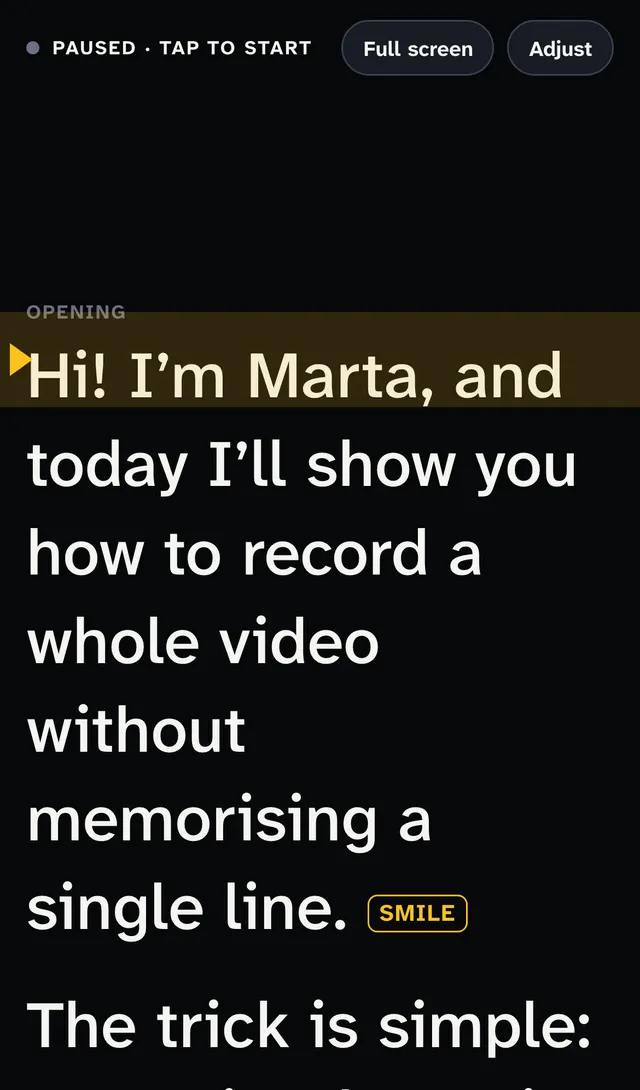
If someone is helping, they can keep the computer and control the text. If you’re on your own, a remote or pedal lets you pause without touching the screen.
Preguntas frecuentes
Does reading a speech look bad?
Not if you look at the audience between sentences. Reading with your head down is what looks bad. With the text at eye level, hardly anyone notices.
What if the venue’s internet fails?
The computer and the tablet need the internet to talk to each other. Bring the speech on paper or as a PDF on the tablet too, just in case.
Can I show the text on a big screen for the speaker?
Yes. Any screen with a browser connects with the QR code, including a stage monitor. On the Pro plan you can connect several at once.